

Business Cash Manager
Can I pay for this and still cover everything else?
You ask yourself some version of that every week.
Cash Manager shows you the answer before you decide.
It works whether your books are current, behind, or do not exist yet.
The Balance Is Only the First Number

You open your banking app and start doing math in your head.
There is a number on the screen. You know some of that cash will be used for upcoming bills. Some payments have not arrived yet. Payroll, taxes, and the other costs of running the business still need to be covered.
You try to hold all of that in your head before you decide.
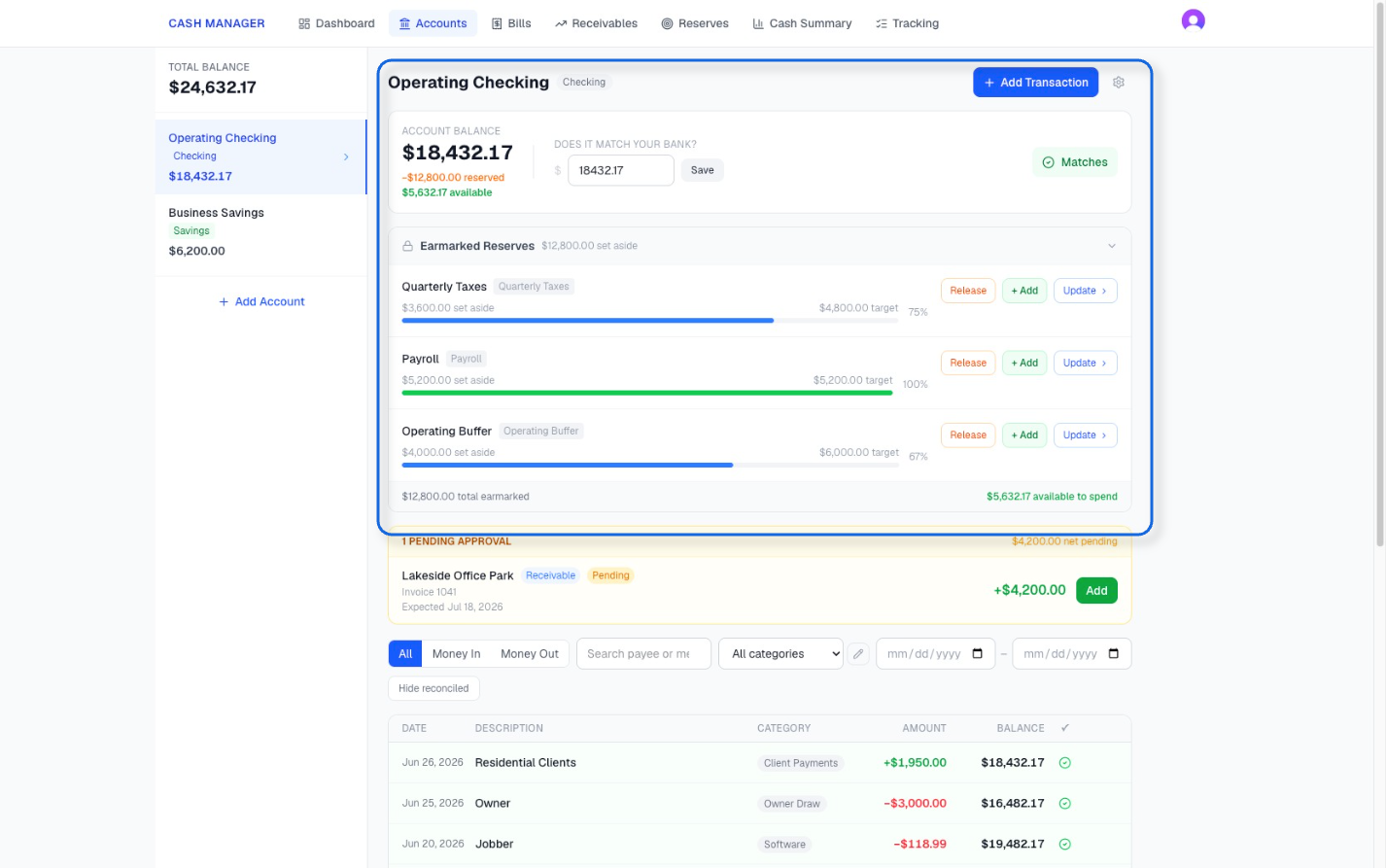
Cash Manager brings those numbers together. See the cash you have, the money set aside in reserves, and what remains available today.
The Questions You Already Ask
Can I pay myself this month?
Can I cover payroll?
Can I pay for this purchase and still cover everything else?
How will this decision affect my cash next month?

Does the business bring in enough cash to cover what it costs to run?
When will my cash run short?
Have I paid every bill due?
Have I received every payment I expected?
Cash Manager brings the cash information behind those questions into one clear picture, so you can see the answer instead of estimating it.
The Question That Usually Comes Later
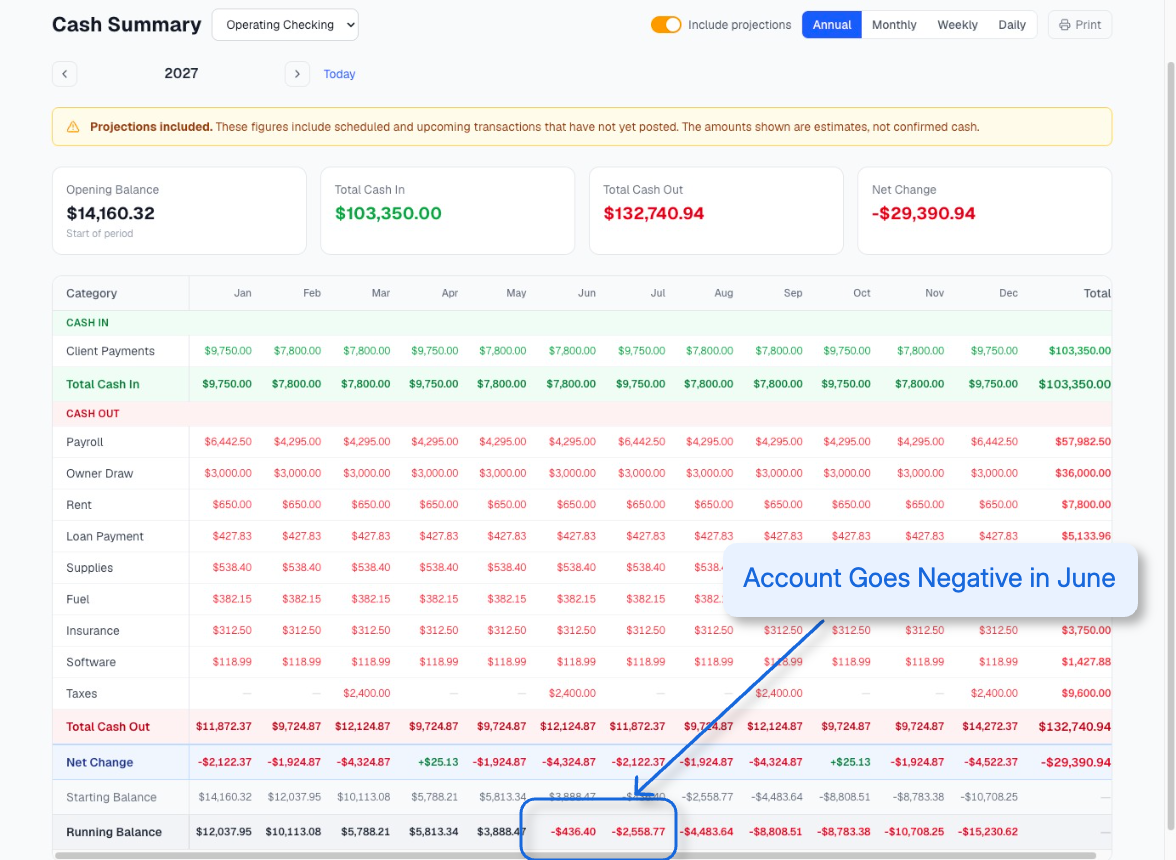
Is there a day when the cash runs short?
If there is, it already has a date and a dollar amount.
Cash Manager shows both before the account gets there.
To see the exact week or day, use the Weekly or Daily View.
Does This Sound Like You?
I Have Nothing Set Up
You check the bank balance, keep receipts and notes in a few places, and try to remember what still needs to be paid.
There is no one place that shows it all.
You can start from today. There is nothing to catch up first.
I Have Books and Still No Clear Answer
Your books are current, behind, or updated on a schedule.
You still open the banking app before paying yourself, covering payroll, or making a purchase because the reports do not answer the cash question in front of you.
Already know Cash Manager fits? Start My 30-Day Trial.
You Can Always See When the Numbers are Different
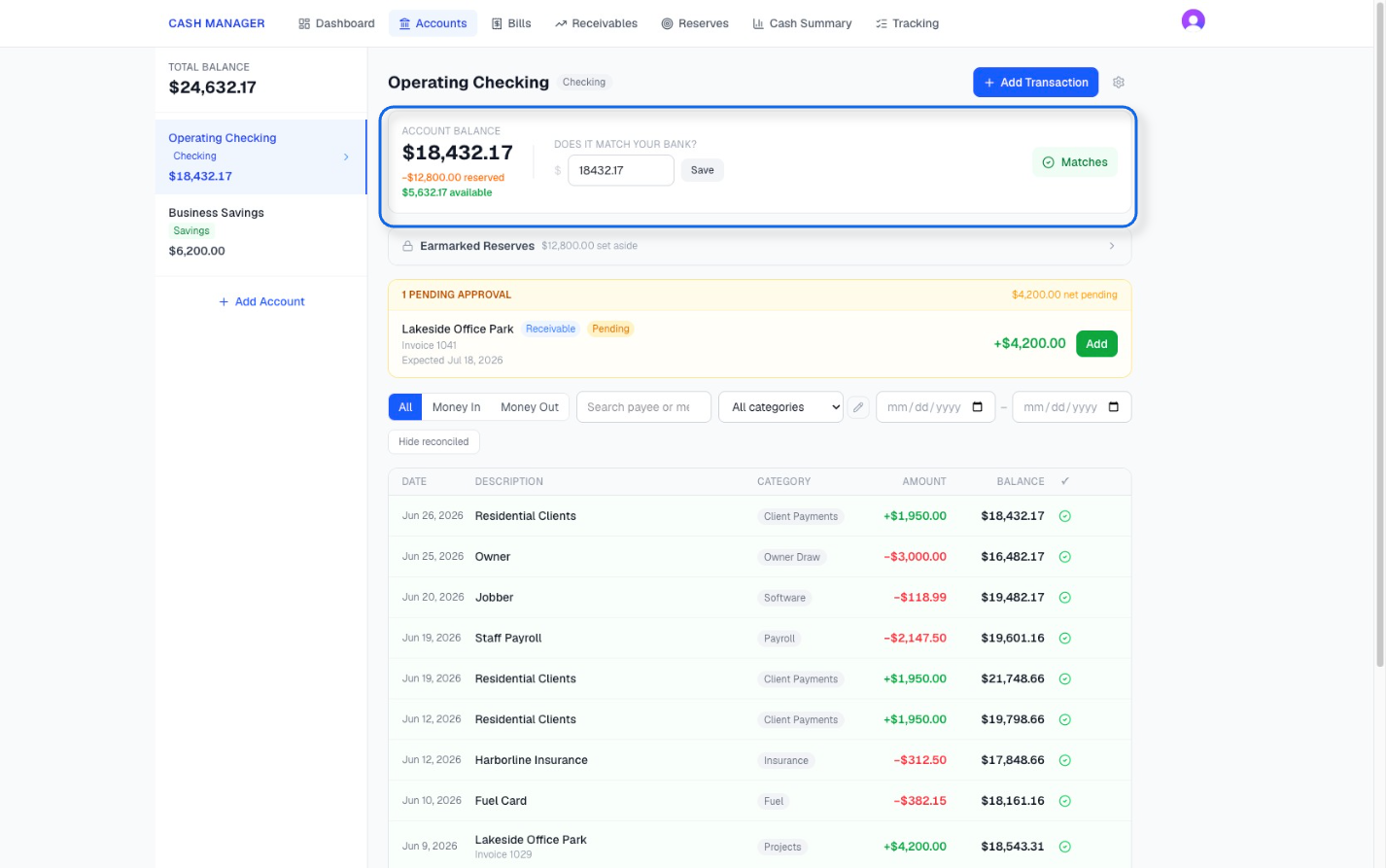
Cash Manager shows its balance next to the balance you enter from your banking app.
When the amounts do not match, you see the exact difference. You can review the activity, add anything missing, correct an entry, and reconcile the account once the balances agree.
You always have a clear way to confirm that the cash picture you are using matches the bank.
Why Cash Manager Exists
As an Enrolled Agent providing bookkeeping, tax, and advisory services, I help small business owners understand their financial and tax position.
Financial records provide important information about the business. Daily cash decisions require a different view.
After years of working with small business owners, the same questions kept coming up, no matter how good their records were.
Can I pay myself? Can I cover payroll? Can I pay for this expense? How will this decision affect my cash?
Answering those questions often meant building another version of the same spreadsheet, one client at a time. That spreadsheet helped connect the financial records to the cash decision the owner needed to make.
I built Cash Manager so small business owners can see those answers for themselves.

Brandy Sparkman, EA
See Your Cash Clearly for $29 Per Month
You already ask the question.
Now you can see the answer before you decide.
Every new business receives a 30-day free trial. Use your own cash information and see the answers you have been trying to calculate from the bank balance. Add your accounting professional, business partner, or team member at no additional charge.
A payment method is required. Cancel before the trial ends and you will not be charged.
Frequently Asked Questions
Still have questions? Reach out anytime. Ready to get started? Start your 30-day free trial.
-
Cash Manager protects your information with encrypted storage, secure account access, and daily backups. Your records belong to your business and are not visible to other customers. Only people in your business can see them, and only the owner can invite someone new. The owner can also see who was added or what was changed.
Payment information is handled securely through Stripe and is never stored in Cash Manager. Cash Manager also never asks for your bank login or connects directly to your bank account.
-
Yes. The business owner can invite anyone by email from the Team page, and there is no extra charge to add team members. Up to 20 people can be on one business, including the owner. Each person signs in with their own login.
Everyone you invite can do the day-to-day work: enter transactions, record payments, reconcile, run reports, and export. Only the owner can invite or remove people, rename or delete the business, and see a record of who entered or changed what. Each business has one owner, and the owner can hand that role to someone else at any time.
Anyone on the business can also pay the subscription. This is useful if your accountant includes Cash Manager in their fee.
The records belong to the business, not to the person who entered them. If your accountant or anyone else stops working with you, everything they entered stays with your business.
-
There are two options, depending on the level of access you want them to have.
To send only what is needed, download your records as separate CSV files for transactions, bills, receivables, and accounts. You can also print your Cash Summary or save it as a PDF.
To let them work in Cash Manager with you, invite them to your business. They sign in with their own login, see the same records you do, and there is no extra charge. See "Can I add my accountant, business partner, or another user?"
-
Yes. You can set up and maintain Cash Manager for your clients as part of the services you offer. Each client has their own business in Cash Manager, and you can move between your clients' businesses from one login.
To add a client, they can create their business and invite you, or you can create it for them and invite them to join. If you create it, you can hand the owner role to your client after they join. Each new business receives its own 30-day free trial.
The subscription can be paid by your client or by you. If you pay, you can include the cost in your fee. If you ever stop paying, your client can take over billing without losing anything.
The records always belong to your client's business, not to you. If you stop working together, everything you entered stays with that business.
-
Every new business receives full access to Cash Manager for 30 days. Nothing is limited or held back during the trial.
A payment method is required to begin. If you continue using Cash Manager after the trial, your selected monthly or annual subscription begins when the 30 days end.
The person who pays can cancel at any time from the account page. If you cancel before the trial ends, you will not be charged, and you can keep using Cash Manager through the end of the 30 days.
The free trial is available once per business. A business that has subscribed before does not receive another 30-day trial. If someone else on the business takes over billing during the trial, the days that are left carry over to them.
-
Cash Manager is a web-based application, so there is nothing to download or install. Sign in through your browser and use the same Cash Manager account from a computer, tablet, or phone.
You can manage your cash information from any of those devices. A larger screen may be more comfortable when reviewing reports, projections, or the full cash picture, while mobile access makes it easy to use Cash Manager wherever you are.
-
No. Cash Manager does not connect directly to your bank account or automatically import transactions.
You enter the balances, bills, expected payments, reserves, and transactions you want to track. You can then compare the balance in Cash Manager with the balance shown in your banking app and reconcile the account when the amounts agree.
This gives you the flexibility to track cash whether it is held in a checking account, savings account, cash drawer, petty cash, or another cash account that may not be connected to a bank.
It also allows you to include upcoming bills, expected payments, and reserves so your cash picture reflects more than the balance showing today.
Cash Manager never asks for your bank login information.
-
Transactions are recorded manually, but you do not have to enter the same information twice.
Recurring bills and expected payments stay on their schedules, so you do not have to re-enter the same details each time. When one is paid or received, you can add the transaction from the scheduled item and Cash Manager moves the recurring schedule forward.
For other transactions, when you enter a payee you have used before, Cash Manager fills in the category you usually use for that payee, saving you from having to categorize the same activity over and over.
You still confirm the transactions that actually happened, while Cash Manager keeps the recurring information and category history working for you.
-
No. You can start with where your business stands today.
If you want a more complete cash record, you can optionally use a recent bank statement. Change the account starting balance to the opening balance on the statement, enter the transactions from that period, and reconcile to the closing balance.
Past transaction entry is optional, not a requirement for getting started.
-
No accounting software or current bookkeeping is required to begin using Cash Manager.
You can start with where your business cash stands today. Enter your cash accounts, upcoming bills, expected payments, and reserves, and Cash Manager begins building your current and projected cash picture from that information.
This means you can use Cash Manager whether your bookkeeping is current, updated periodically, behind, or you do not have a bookkeeping system in place yet.
-
Cash Manager is designed specifically for cash visibility and cash management.
For a simple cash-based business, the transaction record and Cash Summary may provide a practical way to stay organized and prepare information to share with a tax or accounting professional.
Businesses with more complex accounting needs may still need full bookkeeping or accounting records in addition to Cash Manager.
-
If you have a question or need help with Cash Manager, send a message to support@businesscashmanager.com.
Include a brief description of what you need help with so we can better understand the question and respond.